Risk tasks
In the Risk Management app, the My tasks dashboard shows you all the tasks you should implement for a risk or its control, monitoring, or review.
In the Risk Management, there are tasks to mitigate risks. You can create risk tasks manually in the context of a risk. You can have the system automatically create control tasks, monitoring tasks, and review tasks for a control (as described under Risk controls).
Create new risk task
Instructions:
- Open the risk for which you want to create a task
-
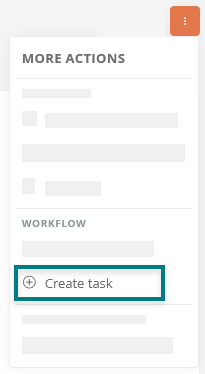
Open the context menu and create a new task:
-
Configure the task:
Property Description Description Enter the name of the task. Description Enter a description of the task. Responsible Enter the name of the user responsible for the task here. Task test Select a user here who should review the task. To be completed by Enter the date by which the task should be completed. File upload / attachment Here you can attach a relevant file to the task. -
Click Create Task
Result:
The task is created and displayed in the My tasks dashboard. Those responsible will be notified of the new task via notifications on the Portal and by email.
Configure tasks via properties
You can further configure the task in the properties and set the following properties in the Risk Management property group:
| Property | Description |
|---|---|
| Frequency | Select the frequency in which the task is to be performed. |
| Regular task | Enable this property if the task is to be performed at regular intervals. |
| Effectiveness | Select the effectiveness of the task. |
| Processing period | Select a processing period within which the task is to be processed. |
| Processing until | Select a date here by which the task should be processed at the latest. |
| As a control task in | Reference a control if the task is to be performed as a control task for a risk. |
| As a monitoring task in |
Reference a control if the task is to be performed as a monitoring task for a risk. |
| As a review task in | Reference a control if the task is to be performed as a review task for a risk. |
| Associated risk | The risk for which you created the task is referenced here. You can change the risk or you can reference other risks. |
| Associated opportunity | Reference an opportunity here. |
Siehe auch: Everything about the My tasks dashboard see My Tasks.